DIY YouTube Branding vs Professional: Horror Guide (2026)
DIY YouTube branding is the right call when your horror channel is brand new, you are still testing your niche and your budget is close to zero. Professional branding pays off once you upload on a schedule, want viewers to recognize you in a crowded feed, and need a logo, banner, watermark and intro that actually match.
Most creators do not need to pick one forever. Below is an honest comparison: what you can realistically make yourself, where DIY horror branding usually breaks, what a professional adds, and a simple test to decide which route fits your channel today.
DIY YouTube Branding vs Professional: The Quick Answer
| Factor | DIY branding | Professional branding |
|---|---|---|
| Cost | $0 to a software subscription, plus your time | One-time fee (NightCaseStudio: $45 to $190) |
| Time | Hours to weekends of trial and error | A short brief, then 3 to 7 days |
| Originality | Templates and stock elements other channels also use | Built around your name, niche and mood |
| Consistency | Hard to make logo, banner and intro feel like one brand | Every asset designed from the same palette and type |
| Motion (intro/outro) | Template animations or none | Custom animation and sound design |
| Ownership | Template logos are non-exclusive | Original artwork, source files on full packages |
| Best for | First uploads, niche testing | Channels posting consistently and ready to grow |
What You Can Realistically DIY
Free and low-cost tools have made it possible for anyone to put up channel art in an afternoon. Canva has a free plan with YouTube banner and logo templates, Photopea runs in the browser, and AI image tools can generate dark backgrounds in seconds. For a horror channel, that is enough to cover:
- A placeholder banner at 2560 × 1440 px with your channel name and upload schedule in the center.
- A simple text logo using one bold font on a dark background.
- Basic thumbnails from a reusable 1280 × 720 px template.
- A watermark made from your initials, at least 150 × 150 px and under 1 MB.
If you go this route, get the specs right first. YouTube’s own help page currently lists these requirements:
| Asset | YouTube spec | DIY tip |
|---|---|---|
| Banner | Minimum 2048 × 1152 px, 2560 × 1440 px recommended, max 6 MB | Keep text in the center safe area (1235 × 338 px at minimum size, about 1546 × 423 px on a 2560 canvas) |
| Profile picture | Renders at 98 × 98 px, up to 15 MB, no animated GIFs | Design at 800 × 800 px and test it as a tiny circle |
| Watermark | Square, at least 150 × 150 px, under 1 MB | One simple shape or monogram, transparent background |
| Thumbnail | 1280 × 720 px, 16:9 | Reuse the same two fonts and one accent color |
Our YouTube banner size guide for horror channels walks through the safe area in detail, and the horror YouTube logo design process shows how to make a mark that still reads at 98 px.
Where DIY Horror Branding Usually Breaks
DIY is not the problem. The problem is that horror has one of the most crowded visual styles on YouTube, and the same shortcuts show up on thousands of channels.
1. The template look
Foggy forest, dripping red font, a skull in the corner. Popular “spooky” templates get used again and again, so your channel blends into the feed instead of standing out. Viewers do not consciously notice, but they also do not remember you.
2. Fonts that die at small sizes
Scratchy, dripping and ultra-thin horror fonts look great at full size and turn into a gray smudge in a 98 px circle. Pick from horror fonts for YouTube that are built to stay readable.
3. Pieces that do not match
A gothic logo from one template, a neon banner from another, a glitch intro from a third. Each piece might look fine alone, but together they say “unfinished.” Consistency is what makes a small channel look like a real show.
4. A logo you do not fully own
Canva’s own help page says its logo templates can be used by anyone, so your rights are non-exclusive and you cannot register that design as a trademark. Stock graphics have the same limit. That is fine for a test channel, but a problem if your channel becomes a business with merch.
5. The hidden cost: your time
Every weekend spent fighting layers and export settings is a weekend not spent scripting, recording or editing. For most horror creators, the next video does more for growth than another banner revision.
What Professional YouTube Channel Branding Adds
A professional designer is not just a better pair of hands in Photoshop. You are paying for decisions: which mood fits your niche, which single detail becomes your signature, and how that detail carries from the profile picture to the last frame of your outro.
- A system, not files. One palette, one or two fonts and one recurring motif used on every asset.
- Original artwork built around your channel name instead of a reskinned template.
- Motion that matches. A short intro and an outro with real end-screen space, in the same style as your banner.
- Niche knowledge. True crime needs restraint, analog horror needs controlled texture, horror gaming needs energy.
- Revisions until it feels right, and source files so you can update it later.
You can see the difference in a real rebrand. Vocrime started with a generic banner and logo, then moved to a custom dark identity:
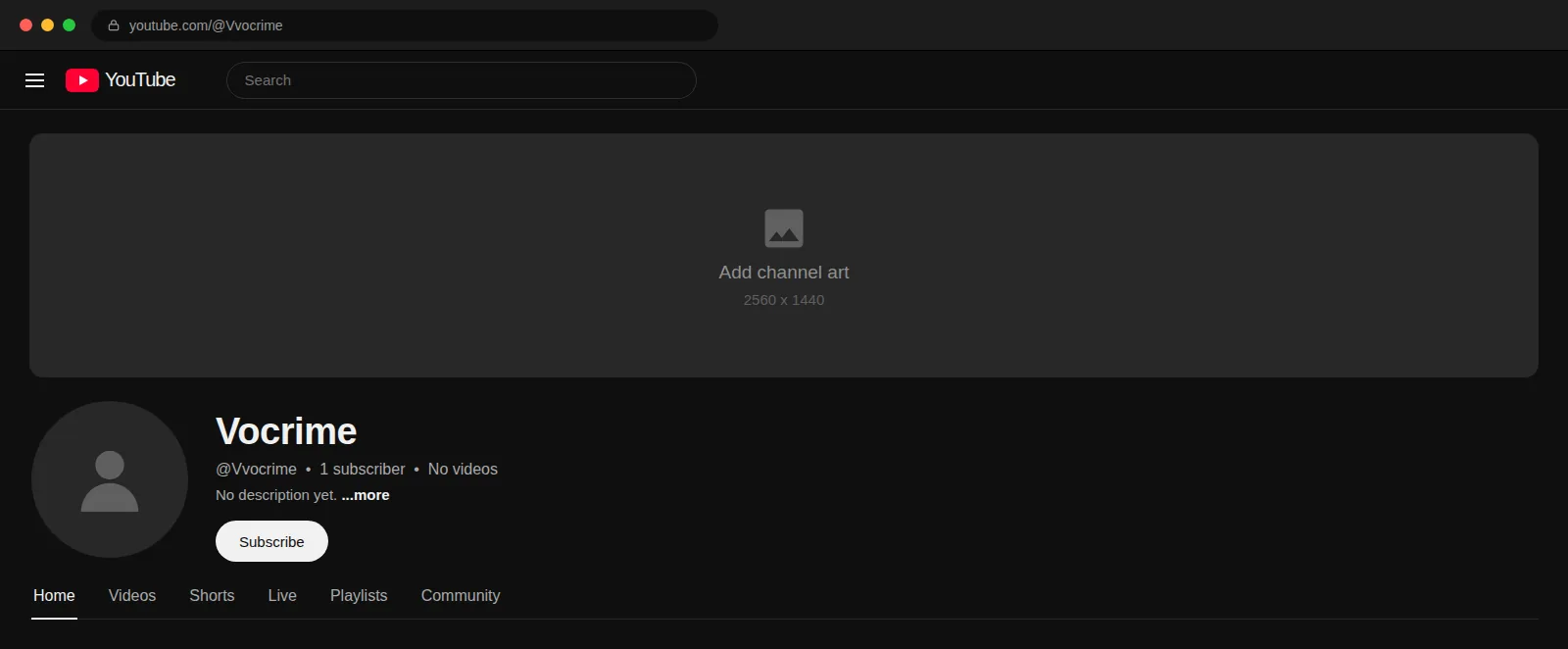
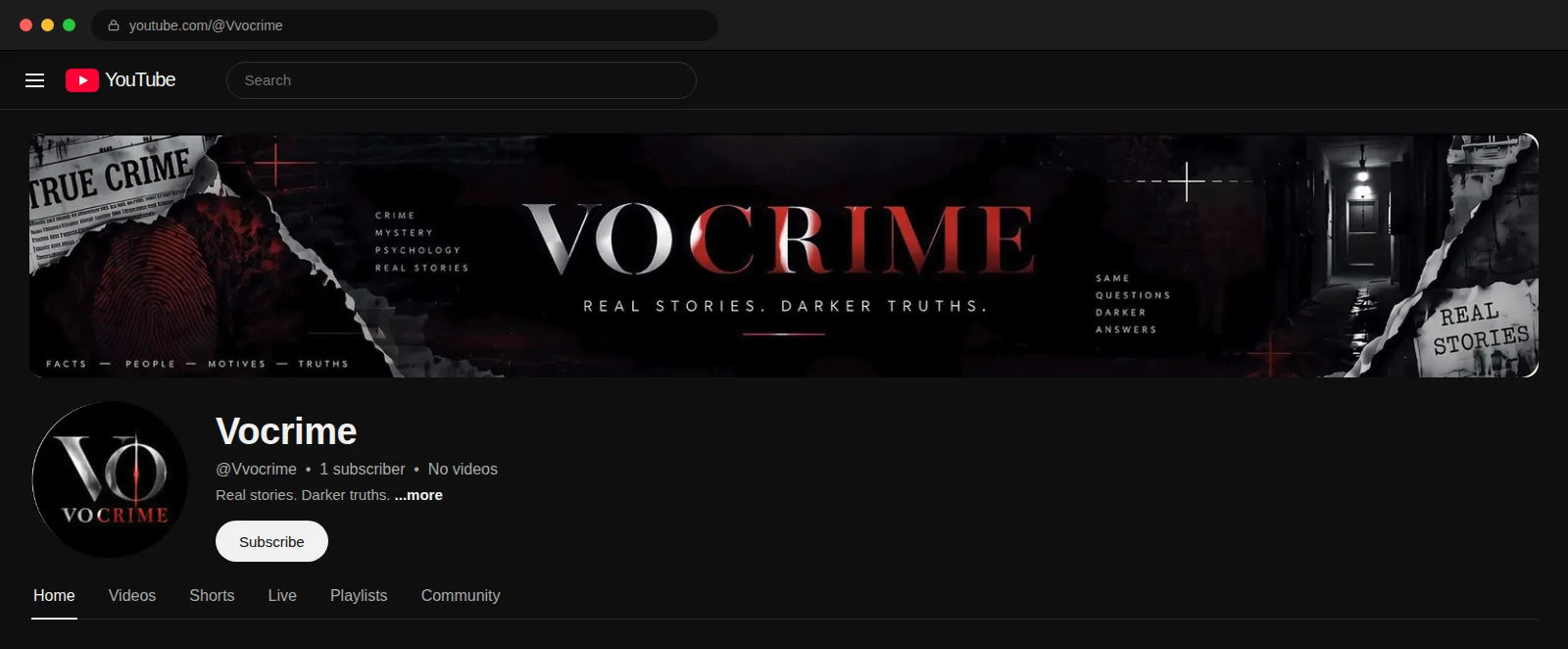
If your channel only needs one piece fixed, you do not have to buy everything. A custom banner is $45 with the Basic package, and banner plus logo is $70 with Standard. For the full breakdown of what each option costs elsewhere, read our YouTube channel branding cost guide.
DIY or Pro? A 5-Question Test
Answer these honestly. Mostly “no” means DIY is fine for now. Two or more “yes” answers mean professional branding will likely pay off.
- Do you upload on a regular schedule and plan to keep going for the next six months?
- Have you settled on your niche (scary stories, true crime, paranormal, horror gaming, analog horror)?
- Do you plan to sell merch or stream on Twitch, Kick or TikTok under the same name?
- Has a viewer ever confused your channel with another one?
- Have you spent more than a weekend trying to fix your channel art yourself?
The Smart Middle Path
Many successful horror channels mix both. A setup that works well:
- Pay for the pieces that carry recognition: logo, banner and, once you post weekly, an intro and outro.
- DIY the pieces that change every week: thumbnails, using a template built from your brand’s fonts and colors.
- Keep the rules written down: hex codes, font names and where the logo goes, so every DIY thumbnail stays on brand.
If you are tempted to skip both and let AI do it, our comparison of AI vs professional design for horror branding covers where AI helps and where it still fails on text and consistency.
DIY Branding Do’s and Don’ts
- Do test your logo at phone size before you upload it.
- Do limit yourself to three colors and two fonts.
- Do check every element’s license before you use it.
- Don’t put text outside the banner safe area.
- Don’t add shadows, borders or frames to your banner (YouTube’s help page says not to).
- Don’t use movie stills, game art or other creators’ work in your channel art.
DIY YouTube Branding FAQ
Can I make my own YouTube banner and logo for free?
Yes. Free tools like Canva’s free plan and Photopea let you build a 2560 × 1440 px banner and an 800 × 800 px logo at no cost. The trade-off is time and originality: templates are shared with many other channels, and template logos are non-exclusive, so they cannot be registered as a trademark.
Is it worth paying for YouTube channel branding?
It is worth it once you upload consistently and have settled on your niche. Branding will not fix weak videos, but a clear logo, a banner that reads on phones and a matching intro help viewers recognize and remember you. If you are still testing ideas, DIY first and upgrade when the channel has momentum.
How do I make my DIY channel branding look professional?
Keep it simple and consistent. Use one dark base color, one accent and two readable fonts on every asset. Keep banner text inside the safe area, test your logo as a 98 px circle, and avoid crowded templates. Repeating the same small signature detail everywhere does more than adding extra effects.
When should I switch from DIY to a professional designer?
Switch when you post on a schedule, plan to stay in your niche, and want to expand to streaming or merch. Another clear sign is spending more time fixing channel art than making videos. Many creators start with a professional logo and banner, then add an intro and outro later.