Cinematic Horror YouTube Banner: How to Create One (2026)
A cinematic horror YouTube banner is a channel header built like a movie poster: one strong scene, controlled light, a title-card logo and a lot of darkness doing the work. To create one, start from a 2560 x 1440 px canvas, keep every word inside the central 1546 x 423 px safe area, and design the scene so it still reads as a single frame on a phone.
Below is the exact process we use for horror, true crime and paranormal channels, with sizes, lighting rules, typography choices and the mistakes that make a “cinematic” banner look like a stock wallpaper.
What Makes a Cinematic Horror YouTube Banner Different
Most horror banners are collages: a skull, some blood, a few textures and the channel name in a distressed font. A cinematic banner works the other way around. It picks one moment, frames it like a shot from a film, and lets the viewer’s imagination fill in the rest.
If you want the bigger picture of why channels are moving this way, read our breakdown of cinematic horror branding on YouTube. Here we focus on the banner itself. The cinematic look usually comes from five things:
- One focal point: a house, a figure, a doorway, a road. Not five.
- Directional light: a single moon, lamp or red rim light instead of flat brightness.
- Depth: foreground, middle ground and background, often separated by fog.
- A wide-screen composition: the scene is designed for the thin strip people actually see.
- Title-card typography: clean, spaced letters that look like a film’s opening title.
YouTube Banner Size and Safe Area for a Cinematic Horror Banner
Cinematic designs break easily because YouTube crops the same image very differently on TV, desktop and mobile. Build around these numbers (full details in our YouTube banner size guide):
| Spec | Value | Why it matters for a cinematic banner |
|---|---|---|
| Recommended canvas | 2560 x 1440 px (16:9) | The full scene is only visible on TV, so paint the whole frame. |
| Minimum upload | 2048 x 1152 px | Anything smaller gets rejected or looks soft. |
| Safe area (all devices) | 1546 x 423 px, centered | Channel name, logo and focal point live here. |
| Max file size | 6 MB | Export a high-quality JPG or PNG under the limit. |
| Profile picture overlap | Shown at about 98 px round on desktop | Don’t place your key detail where the avatar sits on mobile layouts. |
The key lesson: the safe area is a letterbox. That’s good news for cinematic work, because a 1546 x 423 strip is already close to a wide film frame. Compose your hero shot for that strip first, then extend the scene outward for desktop and TV.
How to Create a Cinematic Horror YouTube Banner in 7 Steps
1. Write a one-line “scene”
Before you open any software, describe the banner as a film shot: “A lone farmhouse at the end of a foggy road, one window lit red.” If you can’t say it in one line, the banner will be cluttered. Match the scene to your niche: an evidence wall for true crime, a dark treeline for paranormal, a flickering CRT for analog horror.
2. Set up the canvas and guides
Create a 2560 x 1440 px document and draw guides for the 1546 x 423 px center. Add a second set of guides for the desktop crop (2560 x 423 px). Everything important goes in the center box; atmosphere fills the rest.
3. Block the composition in three layers
- Foreground: dark silhouettes (branches, a fence, a doorframe) that frame the shot.
- Middle ground: your focal subject, slightly off-center using the rule of thirds.
- Background: sky, fog or a light source that creates separation.
4. Light it like a film set
Choose one key light and commit to it. A cold moon from the top left with a warm or red accent on the subject is a classic horror setup. Keep most of the frame in shadow; on a phone, a banner that is 70% darkness with one bright point grabs more attention than a fully lit one.
5. Grade the colors
Cinematic banners usually use a restricted palette: teal and red, black and blood red, or desaturated green for found footage. Add a gradient map or color lookup over the whole scene so every element feels shot with the same camera. Light film grain and a soft vignette finish the look; keep both subtle so the image doesn’t turn muddy after YouTube compression.
6. Add title-card typography
Set the channel name like a movie title: a condensed or elegant serif, generous letter spacing, white or off-white, with a faint glow or red edge. One line of supporting text (“New stories every Friday”) is enough. Make sure the name stays readable at phone width, which is the size most of your audience sees.
7. Test on every device before you publish
Upload, then check the channel on a phone, a laptop and (if you can) a TV. YouTube’s upload screen shows a crop preview, but nothing beats looking at the real page. If the focal point hides behind the profile picture or the text touches the edge, move it and re-export.
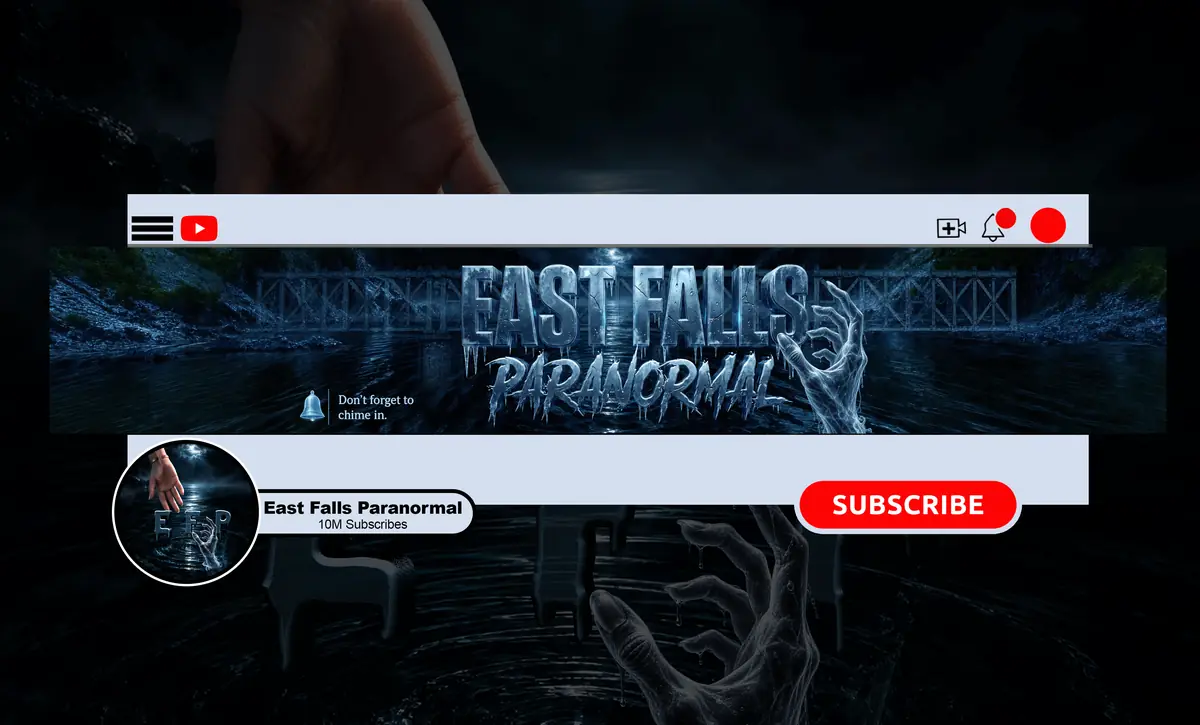
Doing all seven steps well takes time, and the lighting and color grading are where DIY banners usually fall apart. If you’d rather skip the trial and error, our Basic horror banner package gets you a custom cinematic banner for $45 in 3 days, and the Standard package adds a matching logo for $70.
Cinematic Banner Ideas by Horror Niche
- Scary stories and creepypasta: a lit window in an isolated house, a staircase vanishing into darkness, a figure at the end of a hallway.
- True crime: a rain-soaked street at night, a desk lamp over case files, police-tape red accents.
- Paranormal and ghost hunting: a treeline in fog, flashlight beams, a cemetery gate in moonlight.
- Analog horror and found footage: a CRT glow in a dark room, a VHS-style frame with restrained scan lines.
- Horror gaming: a game-inspired environment you designed yourself (never a copied game scene), lit with your brand color.
Want more starting points? Our list of horror YouTube banner ideas covers ten looks by niche.
Do’s and Don’ts
| Do | Don’t |
|---|---|
| Build one clear scene with a single focal point | Stack skulls, blood splatter and five textures |
| Keep all text inside 1546 x 423 px | Put your upload schedule near the edges |
| Use one key light and deep shadows | Brighten everything so details “show” |
| Match the banner colors to your logo and thumbnails | Pick a palette that appears nowhere else on the channel |
| Use original art or properly licensed images | Use movie stills, game screenshots or other designers’ work |
Make the Banner Part of a Full Cinematic Identity
A cinematic banner looks strongest when the rest of the channel speaks the same language: a title-card logo, a watermark in the same typeface, and an intro that opens like the first seconds of a film. When the banner, intro and outro share one color grade, viewers recognize your videos before they read the name. You can see how that plays out in our intro portfolio.
Cinematic Horror YouTube Banner FAQ
What size should a cinematic YouTube banner be?
Design at 2560 x 1440 px, the recommended YouTube banner size, and keep it under 6 MB. The minimum upload is 2048 x 1152 px. Keep your channel name, logo and main subject inside the centered 1546 x 423 px safe area, because that is the only part every device shows.
Why does my YouTube banner look cut off on mobile?
YouTube shows the full 2560 x 1440 image only on TVs. Desktop shows a wide strip, and phones show roughly the central 1546 x 423 px area. If your text or focal point sits outside that box, it gets cropped. Move key elements to the center and re-upload.
What font works best for a horror banner?
For a cinematic look, use a clean condensed sans-serif or a refined serif with wide letter spacing, like a movie title card. Heavy dripping or scratchy fonts can work for some niches, but they often become unreadable at phone size. Always test the channel name at the smallest size viewers will see it.
Can I use a movie or game screenshot in my banner?
It’s risky. Movie stills and game screenshots are usually copyrighted, and using them as channel branding can lead to takedown requests. It also makes your channel look like a fan page instead of a brand. Use original artwork, properly licensed stock, or a custom scene made for your channel.
Get a Cinematic Horror Banner Made for Your Channel
Get a custom cinematic horror YouTube banner built for every screen with the Basic package ($45, 3 days). Add a matching logo with Standard ($70, 4 days), or go full film-style identity with banner, logo, watermark, intro, outro and source files in Premium ($190, 7 days). Unlimited revisions and a full refund if you cancel before work starts. Need Twitch panels or overlays? Message us.